


International Calling・Talk360
4.41.17K Reviews
App Specs
- Version
- 8.28.0
- Updated On
- License
- Free
- Downloads
- 5,000,000+
- Developer
- Talk360 Group B.V.
- Categories
- Communication
- Platform
- Android, iOS
Screenshots

 Analysis by AppCompare
Have you ever found yourself in a pickle, desperately needing to make an international call but worried about the hefty charges? Well, I’ve been there too, and that’s when I stumbled upon International Calling・Talk360. Let me take you through my experience with this app, and maybe it’ll help you decide if it’s the right fit for your international calling needs.
Who benefits most from calling this way?
I would consider Talk360 when the person I need to reach has a regular phone number rather than relying on the same messaging app I use. That distinction matters for family members who prefer a landline, small businesses that publish a telephone number, or someone whose internet access is unreliable. It gives me another route to reach them without asking them to install a matching app first.
A realistic example is calling a relative abroad who uses a basic mobile phone. I can use a Wi-Fi connection at home to place the call, while they answer on the phone they already have. For a longer conversation, I’d check the destination rate and my available credit beforehand, then keep an eye on the call duration. That small bit of preparation is more useful than assuming every international destination costs the same.
What to check before you dial
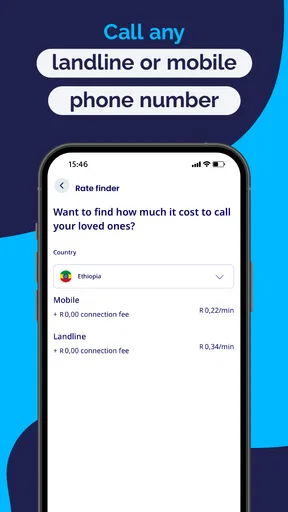
The main practical question is whether the country and number you want to call are covered at a rate that suits you. International calling prices vary by destination, so I wouldn’t treat a general claim of affordability as a guarantee that every call will be cheaper than every alternative. I’d look up the rate for the specific destination before adding credit, especially if the call is likely to be lengthy.
It is also worth thinking about how often you call. For occasional calls, pay-as-you-go credit can be easier to manage than a recurring plan. If you call the same country often, comparing the per-minute cost against your mobile carrier’s international option or another calling service could be worthwhile. The cheapest choice depends on where you are calling and how you use it, not simply on the app category.
There is a useful trade-off here: the person receiving a call can answer on a regular phone, but I still need a working internet connection on my side and enough calling credit. That makes this a different proposition from a free app-to-app voice call. If both people are comfortable with a messaging service and have dependable internet, that service may be the simpler no-credit option. Talk360 makes more sense when reaching an ordinary phone number is the point.
Getting Started with Talk360
Downloading International Calling・Talk360 was a breeze. It’s available on both Android and iOS, so no one’s left out. Once I had it installed, setting up was as simple as pie. You don’t need to jump through hoops of registering long-winded details. A phone number and you’re good to go. I liked that it didn’t require a SIM card swap or any other technical gymnastics.
Worth Reading Before You Choose

EA SPORTS FC Mobile 26 Is a Bigger Football Game, but It Takes Time

Flipboard Shows What News Apps Must Do Beyond the Feed

Switching to Android Auto Means Rethinking Your Driving Routine

Google Calendar Makes a Crowded Week Easier to Manage

Ludo King Makes the Most of the Minutes Between Plans

Baby Panda World Brings Quick Play to Modern Phones, but Its Game Library Feels Busy
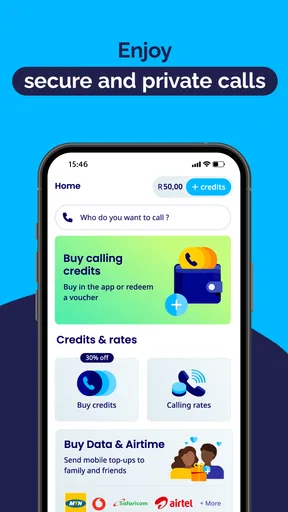
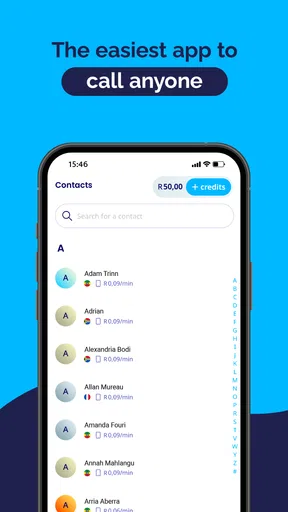
The user interface is slick and straightforward. You’re greeted with a clean, intuitive design that doesn’t overwhelm you with options. It’s like they knew I wanted to get straight to calling without unnecessary detours. Navigating through the app felt almost second nature after a few minutes of exploring.
Talk360 is a free communication app from Talk360 Group B.V., with calling credit and other in-app purchases available. I see that distinction as important: installing it does not mean international calls themselves are automatically free. The app has an Everyone age rating, and it has a 4.4 average from around 42,000 ratings, with more than five million installs. Those figures suggest that many people have tried it, but they can’t predict whether a particular destination, connection, or call pattern will suit me.
The Calling Experience
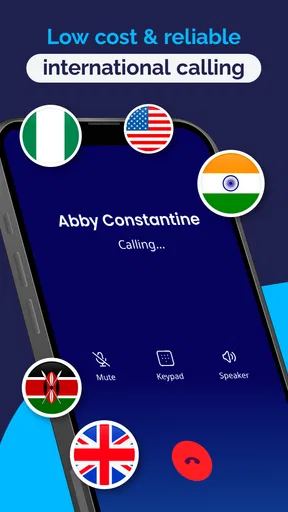
Now, let’s get to the meat of it – the calling experience. I was honestly impressed. The call quality was as clear as a bell, with no annoying lags or echoes. It felt like I was chatting with someone just a few blocks away, not across the globe.
What’s more, Talk360 works on Wi-Fi and mobile data. So, whether you’re chilling at home or on the go, you can make your calls without fretting over connectivity issues. I tested it with both, and I was pleased to see the performance didn’t dip regardless of the network.
Speed, signal, and busy moments
For an internet-based call, the quality I experience depends not only on Talk360 but also on the connection at the moment I dial. A strong Wi-Fi signal can still struggle if the network is congested, and mobile data can vary as I move between places. I wouldn’t judge the service from one call made in a noisy café or a weak-signal corner. If a conversation matters, I’d first try a short call from the spot where I expect to speak.
When I’m making a longer call, I’d avoid starting it while switching networks or walking through areas where reception changes frequently. That is a practical way to reduce interruptions, not a guarantee that every call will remain perfect. If audio begins to break up, moving closer to the Wi-Fi router or finding a steadier mobile signal is a sensible first step before assuming the app itself is at fault.
It is also worth separating app responsiveness from call performance. A simple screen can feel quick to navigate, while the actual conversation still relies on the available connection. For an urgent call, I would keep a regular phone-call option in mind as a fallback, particularly if I have no dependable data access. Talk360 is a useful route, but it does not remove the basic need for connectivity.
Cost-Effectiveness
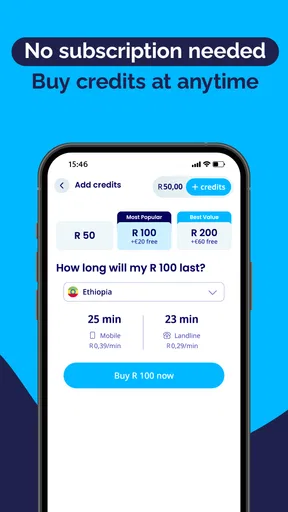
Let’s talk money, because who doesn’t want to save a few bucks? The app offers competitive rates for international calls, and you pay as you go. No need for subscriptions or hidden fees creeping up on you. I found the rates quite fair, especially compared to traditional services.
I also appreciated the option to top up credits in small amounts. There’s no pressure to purchase large chunks if you’re just an occasional caller. It’s perfect for those unexpected moments when you need to dial abroad.
Because credit is spent as calls are made, I’d treat topping up as a small budgeting decision rather than an automatic purchase. Before a planned conversation, checking the destination and estimating how long I expect to talk helps me choose an appropriate amount. If I only need to pass along a quick message, a free text or voice note through a messaging app may be a better fit; if the recipient needs a normal call, Talk360 may be more practical.
Reliability and recovery
For dependable use, I’d make sure I can sign in and place a brief test call before I need to reach someone in a hurry. Keeping the app current is sensible too: the current version is 8.28.0, and it supports Android 6.0 or later. On an older device, the operating system requirement is worth checking before relying on the app. I would not assume that an older phone will feel as responsive as a newer one simply because it meets the minimum.
If a call fails, I’d check the basics in order: whether the phone has internet access, whether the app can connect, and whether there is enough credit for the destination. Then I’d try again from a steadier connection. This is a straightforward troubleshooting routine, but it also highlights a limitation: when the network is down or the account has no usable credit, an internet calling app cannot serve as a dependable substitute for every ordinary call.
For people who make international calls regularly, call history can help with a simple personal check on who they contacted and when. I would still use it as a convenience rather than a complete spending record; reviewing credit and destination rates directly is the better habit when keeping a close eye on costs.
Device demands and daily fit
Talk360 is focused on making calls, so I would not choose it for a broad set of messaging or collaboration tools. Its relatively direct purpose can be an advantage when I just want to reach a phone number, but someone looking for group chats, shared files, or a full internet-calling community may prefer a familiar messaging app. The choice comes down to whether the person on the other end can use that alternative.
On a device with limited free space or an older operating system, I’d check compatibility and leave enough room for routine app updates rather than waiting until the moment I need to call. I can’t infer exact battery or data use for every phone and network, so I’d be cautious about making a long call over mobile data if my plan is tight. Using Wi-Fi when it is reliable is a practical way to avoid relying on mobile data, though the call still depends on that Wi-Fi connection’s quality.
People who rarely call abroad, already have a good international calling plan, or can reach everyone they need through free app-to-app calls may not gain much from adding another calling option. I’d also skip it as my only route for a critical conversation if I cannot count on internet access. Its strongest fit is narrower and clearer: someone who sometimes needs to reach an international landline or mobile number and wants a straightforward, credit-based option.
Extra Features
Aside from the core calling feature, Talk360 has a few extra perks up its sleeve. There’s an option to earn free credits through referrals. It’s kind of like getting rewarded for sharing a good deal with friends. I gave it a shot, and it was a nice little bonus to my credit balance.
Another handy feature is the call history. It keeps a neat record of my calls, making it easy to track who I’ve been chatting with and when. It’s a small detail, but one that adds to the overall usability of the app.
I’d treat referral credit as an occasional extra, not as the reason to install the app or as a dependable way to fund calls. The useful everyday habit is to keep track of your own credit and use call history to recognize recent conversations. That way, the two features support practical calling rather than encouraging a top-up or referral just for its own sake.
Final Thoughts
In a nutshell, International Calling・Talk360 fits the bill for anyone looking for a reliable and cost-effective way to make international calls. The app’s simplicity and effective functionality make it a pleasure to use. If you’re tired of the usual hassle with international calls, this might just be your new go-to app.
Sure, it’s not perfect, but it does what it promises without any major hiccups. So, if you’re in the market for an international calling app that won’t break the bank, give Talk360 a whirl. You might just find it as handy as I did.
My performance verdict is positive, with a sensible caveat: the app’s uncomplicated calling approach is appealing, but speed and stability still depend on the connection and on having credit for the destination. I’d use it for planned calls to people who answer ordinary phone numbers, test it before an important conversation, and compare rates if I call one country often. If the people I contact are already available on a free messaging service, or if I need a call that works without internet, I’d choose another route. For the right situation, Talk360 is a practical addition rather than a replacement for every way I communicate.
Pros
- Affordable international calling rates.
- User-friendly interface for easy navigation.
- Reliable call quality with minimal drops.
- No need for a new SIM card to use.
- Supports multiple payment methods.
Cons
- Requires stable internet for optimal use.
- Limited free trial minutes available.
- Not available in all countries.
- No video call feature included.
- Occasional app crashes reported.
FAQs for International Calling・Talk360
What is Talk360 and how does it work?
Talk360 is an international calling app that allows users to make affordable international calls to landlines and mobile numbers worldwide. It works over the internet, utilizing VoIP (Voice over Internet Protocol) technology, which means you need a stable internet connection to use it. The app is available on both Android and iOS platforms and offers a simple, user-friendly interface for seamless calling.
How does Talk360 compare to other international calling apps?
Talk360 stands out due to its competitive pricing, high-quality call connections, and ease of use. Unlike some other apps, it doesn’t require the person you’re calling to have the app installed, making it convenient for reaching anyone, anywhere. Its pay-as-you-go model means you only pay for the minutes you use, with no hidden fees or subscriptions.
Is Talk360 safe to use for international calls?
Yes, Talk360 is safe and secure. The app uses encryption to protect your calls and personal data. Additionally, Talk360 regularly updates its security features to ensure your privacy is maintained. Users can feel confident that their information is handled responsibly and securely while using the app.
What are the costs involved in using Talk360?
Talk360 operates on a pay-as-you-go basis, allowing users to purchase credits to make calls. There are no monthly fees or subscriptions, and the app provides transparent pricing for each destination. This means you only pay for what you use, making it a cost-effective solution for international communication.
Can I use Talk360 without an internet connection?
No, Talk360 requires an internet connection to operate as it uses VoIP technology. A stable Wi-Fi connection or mobile data is necessary to make calls through the app. However, once connected, the app ensures high-quality call clarity, making it a reliable choice for international calls.


